DJI Air 3 Arm Replacement: A Complete 5-Step Guide
Did your DJI Air 3 crash and snap an arm? A broken arm is one of the most common structural failures after impact — and the good news is a DJI Air 3 arm replacement is entirely doable at home with basic tools. This guide covers both the standard Air 3 and the newer Air 3S, as their arm assemblies are nearly identical.
A cracked or broken arm means your drone is grounded. But sending it to DJI for an arm repair can cost $150-$300 and take weeks. By doing a DJI Air 3 arm replacement yourself, you pay only $25-$50 for the part and finish the job in under an hour. Based on repair data shared on r/dji on Reddit, arm damage is the second most common structural issue on Air 3 models after propeller strikes.
Below is our complete DJI Air 3 arm replacement guide, covering symptoms, compatible parts, a 5-step replacement process, cost breakdown, and common mistakes.
DJI Air 3 Arm Replacement A Complete 5-Step Guide
What Is the DJI Air 3 Arm Assembly?
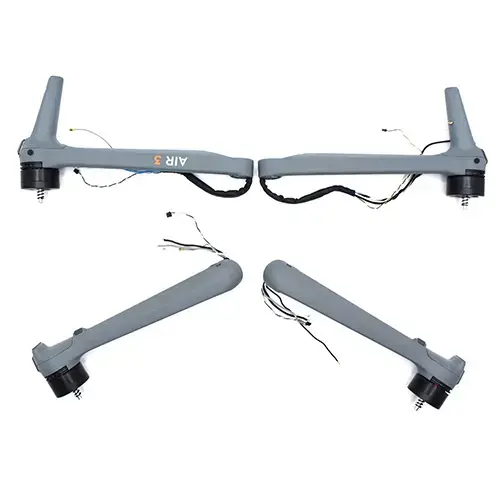
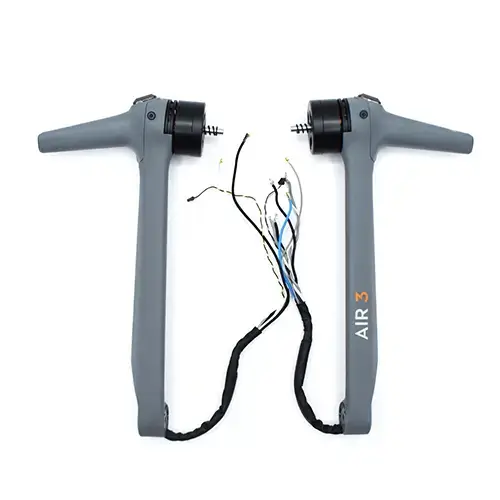
The arm on a DJI Air 3 is a modular structural component that houses the motor, ESC (electronic speed controller), and part of the wiring harness. Each of the four arms attaches to the central chassis with mounting screws and a ribbon connector. The Air 3S uses the same arm design with minor connector differences, so most DJI Air 3 arm replacement parts also fit the Air 3S.
Because the arm is the first point of impact in a sideways or forward crash, it is designed to absorb force and can be replaced individually — you do not need to replace the entire chassis. A targeted DJI Air 3 arm replacement restores full structural integrity and flight performance.
Symptoms You Need a DJI Air 3 Arm Replacement
How can you tell if your drone needs a DJI Air 3 arm replacement? Look for these warning signs:
- Visible crack or break in the arm — inspect the arm near the motor mount and the hinge area
- Motor vibration during flight — a cracked arm causes asymmetric vibration even if the motor is fine
- Propeller strikes the arm — the arm is bent enough that the prop clearance is reduced
- Arm feels loose at the hinge — the folding mechanism is damaged from impact
- Drone tilts to one side during hover — structural misalignment from a bent arm
If you see any of these signs after a crash, a DJI Air 3 arm replacement is needed before your next flight. Flying with a damaged arm risks motor failure and complete loss of the drone.
Tools Required for DJI Air 3 Arm Replacement
Before starting your DJI Air 3 arm replacement, gather these tools:
- New DJI Air 3 replacement arm — front left, front right, rear left, or rear right (they are not interchangeable between positions)
- Precision screwdriver set with PH00 and T6 Torx bits
- Plastic spudger or pry tool
- Tweezers for handling the small ribbon connector inside the arm
- Heat gun or hair dryer (optional — helps loosen threadlocker on screws)
We stock genuine DJI Air 3 replacement arms in our drone parts shop for all four positions, sourced directly from the Shenzhen supply chain.
Step-by-Step DJI Air 3 Arm Replacement Guide
Follow these five steps carefully to complete your DJI Air 3 arm replacement:
Step 1: Prepare the Drone
Power off the drone and remove the battery and all propellers. Clean the drone body to remove any debris from the crash. Place the drone on a stable, well-lit surface with the damaged arm facing up.
Step 2: Remove the Bottom Plate
Using a PH00 screwdriver, remove the four screws on the bottom plate near the damaged arm. Gently pry the bottom plate off using a plastic spudger. You will see the arm mounting screws and the ribbon cable connector inside.
Step 3: Disconnect the Arm
Remove the two or three mounting screws securing the arm to the chassis (the exact count varies by arm position). Carefully disconnect the ribbon connector from the main board using tweezers. Gently slide the old arm out of its hinge slot.
Step 4: Install the New Arm
Insert the new DJI Air 3 replacement arm into the hinge slot. Reconnect the ribbon cable to the main board connector — ensure it is fully seated and the locking tab clicks closed. Tighten the mounting screws to secure the arm. Be careful not to overtighten, as the plastic threads can strip easily.
Step 5: Test and Fly
Reattach the bottom plate and tighten the screws. Power on the drone without propellers. Run the motor test in the DJI Fly app for the repaired arm — listen for smooth rotation with no grinding. If the motor test passes, attach propellers and take a short hover test at low altitude. Check for vibration and stable flight before full operation.
Cost Comparison: DIY vs Professional Arm Repair
A DJI Air 3 arm replacement is one of the most cost-effective DIY repairs you can do. Here is the breakdown:
| Option | Cost | Turnaround Time |
| DIY replacement (arm part only) | $25 – $50 | 30 – 45 minutes |
| Local repair shop | $80 – $150 | 2 – 5 days |
| DJI official repair | $150 – $300 | 2 – 4 weeks |
By completing the DJI Air 3 arm replacement yourself, you save 70-85% compared to DJI official pricing. For a broader cost comparison, read our guide on drone repair costs: DIY vs professional service.
Common Mistakes to Avoid
- Using the wrong arm position — front left, front right, rear left, and rear right arms are not interchangeable. Check your part before starting.
- Cross-threading the mounting screws — the plastic threads strip easily. Hand-tighten first, then use the screwdriver gently.
- Pinching the ribbon cable — when closing the bottom plate, ensure the ribbon cable is fully inside the chassis and not caught between the plate and the frame.
- Skipping the motor test — always run the motor test before attaching propellers. A misaligned arm can cause the motor to bind and overheat.
- Forgetting to transfer parts — if your new arm does not come with a pre-installed motor, you may need to transfer the motor and ESC board from the old arm.
Where to Buy DJI Air 3 Replacement Arms
For a successful DJI Air 3 arm replacement, use a genuine OEM or high-quality compatible arm. We carry replacement arms for all four positions in our online store, sourced from the Shenzhen supply chain with fast global shipping.
Not sure which arm you need? Send photos of your damaged arm to our WhatsApp at +372 5319 5852 and we will identify the correct part within hours. For more repair guides, visit our drone repair blog.
External reference: For official DJI Air 3 specifications, visit the DJI Air 3 product page. For community repair discussions, see r/dji on Reddit.
