
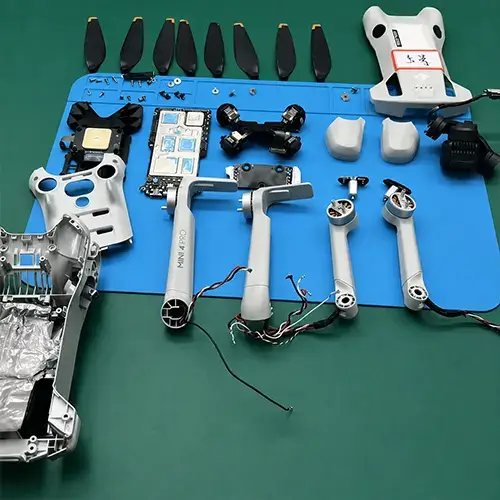
DJI Mini 4 Pro Gimbal Ribbon Cable Replacement: A 7-Step Essential Guide
Is your DJI Mini 4 Pro gimbal twitching, unresponsive, or showing a “Gimbal Overloaded” error after a crash? The most likely culprit is a damaged gimbal ribbon cable (also called the PTZ flex cable). This DJI Mini 4 Pro gimbal ribbon cable replacement guide will walk you through every step to get your drone flying again.
The gimbal ribbon cable is one of the most vulnerable components on any DJI drone. According to repair data shared on r/dji on Reddit, ribbon cable damage accounts for roughly 60% of Mini 4 Pro gimbal issues after crashes or hard landings. The good news? A DJI Mini 4 Pro gimbal ribbon cable replacement costs only $15-$25 in parts and takes about 30 minutes — saving you $200-$400 compared to sending it to DJI.
Below you will find our complete DJI Mini 4 Pro gimbal ribbon cable replacement guide, covering symptoms, tools, a detailed 7-step process, cost comparisons, and common mistakes to avoid.
What Is the DJI Mini 4 Pro Gimbal Ribbon Cable?
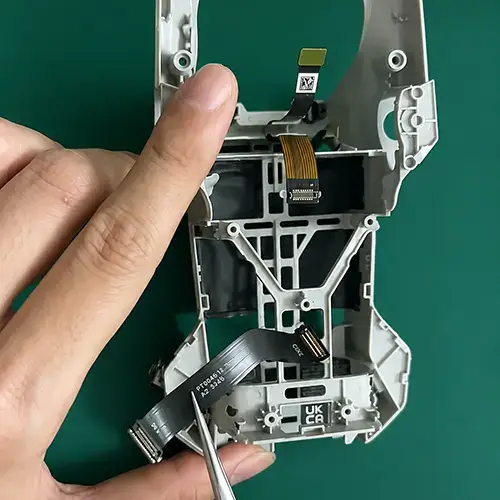
DJI Mini 4 Pro gimbal ribbon cable replacement – genuine PTZ flex cable for gimbal repair
The gimbal ribbon cable (also called the PTZ flex cable or FFC cable) is a thin, multi-conductor flat cable that connects the gimbal camera assembly to the main flight controller board. It transmits power, video signal, gimbal control data, and sensor information between the camera module and the drone’s main processor.
On the DJI Mini 4 Pro, this cable routes through a narrow channel in the gimbal arm. Because it is exposed and flexible, any impact to the camera area can tear, pinch, or kink the cable. Unlike an ESC or motor failure, a damaged ribbon cable does not require a full gimbal replacement — just a targeted DJI Mini 4 Pro gimbal ribbon cable replacement restores full function.
Common Symptoms You Need a DJI Mini 4 Pro Gimbal Ribbon Cable Replacement
How can you tell if your drone needs a DJI Mini 4 Pro gimbal ribbon cable replacement? Look for these five warning signs:
- Gimbal twitching or jittering — the camera shakes randomly during hover or flight. This is usually the first sign of a partially torn ribbon cable.
- “Gimbal Overloaded” error message — the gimbal motors cannot move freely because the cable is pinched or shorting.
- Gimbal hangs completely limp at startup — no power reaching the gimbal motors. The self-test fails immediately.
- Camera feed is black, distorted, or flickering — the video signal lines in the ribbon cable are broken or shorted.
- Gimbal calibration fails repeatedly — the IMU calibration passes but the gimbal calibration always stops at the same point.
If you experience any of these issues after a crash or hard landing, a DJI Mini 4 Pro gimbal ribbon cable replacement is the most effective fix. Often the cable looks intact from the outside but has microscopic tears inside the flex layers.
Tools Required for the Replacement
Before starting your DJI Mini 4 Pro gimbal ribbon cable replacement, gather these tools:
- New DJI Mini 4 Pro gimbal ribbon cable — ensure it is the correct version for the Pro model (non-Pro Mini 4 cables use a different connector)
- Precision screwdriver set with PH00 and PH0 bits
- Plastic spudger or pry tool (metal tools can scratch the PCB)
- Anti-static tweezers for handling the tiny ZIF connector
- Magnifying light or headset — the ribbon connector pins are less than 1mm apart
- ESD-safe mat or clean wooden table
We stock the genuine DJI Mini 4 Pro gimbal ribbon cable in our drone parts shop, sourced directly from the Shenzhen supply chain.
Step-by-Step DJI Mini 4 Pro Gimbal Ribbon Cable Replacement
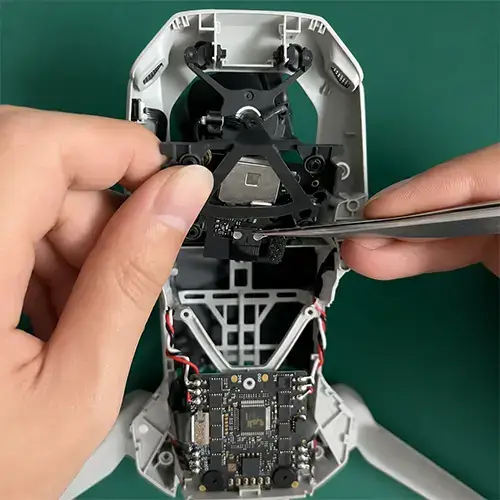
DJI Mini 4 Pro gimbal ribbon cable replacement – opening ZIF connector on main board during repair
Follow these seven steps carefully to complete your DJI Mini 4 Pro gimbal ribbon cable replacement:
Step 1: Prepare Your Drone
Power off the drone completely. Remove the intelligent flight battery and all four propellers. Place the drone upside down on a clean, well-lit, ESD-safe surface with the camera pointing toward you.
Step 2: Remove the Top Shell
Using a PH00 screwdriver, remove the four screws on the bottom of the drone. Gently separate the top shell from the body using a plastic spudger, starting at the rear near the battery bay. Work your way forward carefully — the antenna wires run through channels in the front of the shell and can tear if you pull too hard.
Step 3: Disconnect the Old Ribbon Cable from the Main Board
Locate the gimbal ribbon connector on the main board. It is usually labeled “PTZ” or “Gimbal” and sits near the front edge of the board. Using your spudger or fingernail, gently flip up the small black locking tab on the ZIF connector. The tab rotates about 30 degrees upward. Once unlocked, carefully slide the ribbon cable straight out using tweezers. Never pull on the cable itself — always grip the reinforced tab at the end.
Step 4: Remove the Gimbal Unit
Remove the three screws securing the gimbal mounting plate to the drone chassis. Gently lift the entire gimbal and camera assembly out. The ribbon cable will thread through a small channel in the gimbal arm. Take a photo at this stage so you remember the exact routing path for reassembly.
Step 5: Install the New Ribbon Cable
On the gimbal side, open the second ZIF connector by flipping its locking tab. Remove the old cable completely. Insert the new DJI Mini 4 Pro gimbal ribbon cable into both connectors — first the gimbal side, then the main board side. Ensure the cable is oriented with the correct side up (the metal contacts face the locking tab). Gently close both ZIF locking tabs. Verify the cable lies flat with no twists or folds. Any kink will cause intermittent connection issues or a short circuit.
Step 6: Reassemble
Thread the new cable through the gimbal arm channel following the same path as the original. Reinstall the gimbal assembly and tighten the three mounting screws. Route the cable neatly along the chassis, using the original cable guides. Reconnect the ribbon cable to the main board. Reattach the top shell, ensuring no wires are pinched between the shell and the frame. Tighten the four bottom screws.
Step 7: Test and Calibrate
Power on the drone without propellers. Watch the gimbal self-test — the camera should initialize smoothly, panning left and right without hesitation. Open the DJI Fly app and navigate to the gimbal calibration menu. Run a full gimbal calibration. If it passes, take a short test flight at low altitude and check the footage for stability.
Cost Comparison: DIY vs Professional Repair
One of the biggest advantages of a DJI Mini 4 Pro gimbal ribbon cable replacement is the cost savings. Here is the breakdown:
| Option | Cost | Turnaround Time |
| DIY replacement (parts only) | $15 – $25 | 30 minutes |
| Local repair shop | $100 – $200 | 2 – 5 days |
| DJI official repair | $200 – $400 | 2 – 4 weeks |
By performing the DJI Mini 4 Pro gimbal ribbon cable replacement yourself, you save 80-90% compared to the official service. For more detailed cost comparisons, read our guide on drone repair costs: DIY vs professional service.
Common Mistakes and How to Avoid Them
- Skipping ESD protection — static discharge can permanently damage the camera sensor. Always touch a grounded metal surface before handling the ribbon cable or main board.
- Forcing the ZIF connector — if the cable does not slide in easily, check alignment. ZIF connectors break if forced, and a broken connector means a full main board replacement.
- Kinking the new cable during routing — the cable must follow the original path exactly. A sharp bend (radius less than 2mm) will cause the replacement to fail within a few flights.
- Using the wrong cable — the Mini 4 (non-Pro) and Mini 3 cables have different connector layouts. Verify you have the correct Mini 4 Pro gimbal ribbon cable before starting.
- Skipping calibration — always run gimbal calibration after reassembly. Even if the gimbal moves freely, the software needs to learn the new cable’s electrical characteristics.
Where to Buy Genuine Mini 4 Pro Ribbon Cables
For a successful DJI Mini 4 Pro gimbal ribbon cable replacement, you need a genuine OEM-grade cable. We supply authentic DJI-compatible ribbon cables in our online store, with direct sourcing from the Shenzhen electronics supply chain.
If you are unsure which cable fits your drone, send photos of your current cable to our WhatsApp at +372 5319 5852 and we will identify the correct part within hours. You can also explore more repair guides on our drone repair blog for other DJI models.
External reference: For official DJI product specifications, visit the DJI Mini 4 Pro product page. For community repair discussions, see r/dji on Reddit.

